Introduction
You type a destination into Google Maps on your Android phone. Within three seconds, you see a route, a traffic-adjusted arrival time, and a voice ready to guide every turn. But how does Android navigation work at a technical level—what is actually happening from the moment you enter a destination to the moment you arrive?
Android navigation combines GPS positioning, cloud computing, machine learning, real-time traffic data, and sophisticated routing algorithms into one of the most complex real-time software systems ever deployed on a consumer device. In this guide, we break down every layer of the technology—from the satellites above to the algorithms below—that makes Android navigation work.
Also Read: How Does GPS Work Underground and in Underground Tunnels?
The Android Location Architecture
Android navigation does not begin with Google Maps. It begins with Android’s Location Services framework—the operating system layer that manages all location input from multiple sources and provides a unified, fused position to any app that requests it.
Android Location Providers
Android manages three location providers simultaneously:
1. GPS Provider—direct GPS satellite positioning
- Highest accuracy (1–5 meters)
- Slowest to acquire (seconds to minutes)
- Requires outdoor sky view
- Highest battery use of the three
2. Network Provider—Wi-Fi and cell tower positioning
- Moderate accuracy (15m–3km)
- Very fast acquisition (seconds)
- Works indoors and outdoors
- Lower battery use
3. Passive Provider—piggybacks on location data already gathered by other apps
- Uses cached location data
- Zero additional battery use
- Lower accuracy and timeliness
Android Fused Location Provider
The key innovation in modern Android location is the Fused Location Provider (FLP)—introduced with Google Play Services. The FLP:
- Combines all three location providers intelligently
- Applies sensor fusion algorithms to produce a single, optimally accurate location estimate
- Manages which hardware is active to minimize battery consumption
- Provides location updates at the frequency each app actually needs
- Handles transitions between location technologies automatically
When Google Maps requests your location, it is receiving the FLP output—not raw GPS data. This is why Maps shows your location quickly even before GPS fully locks.
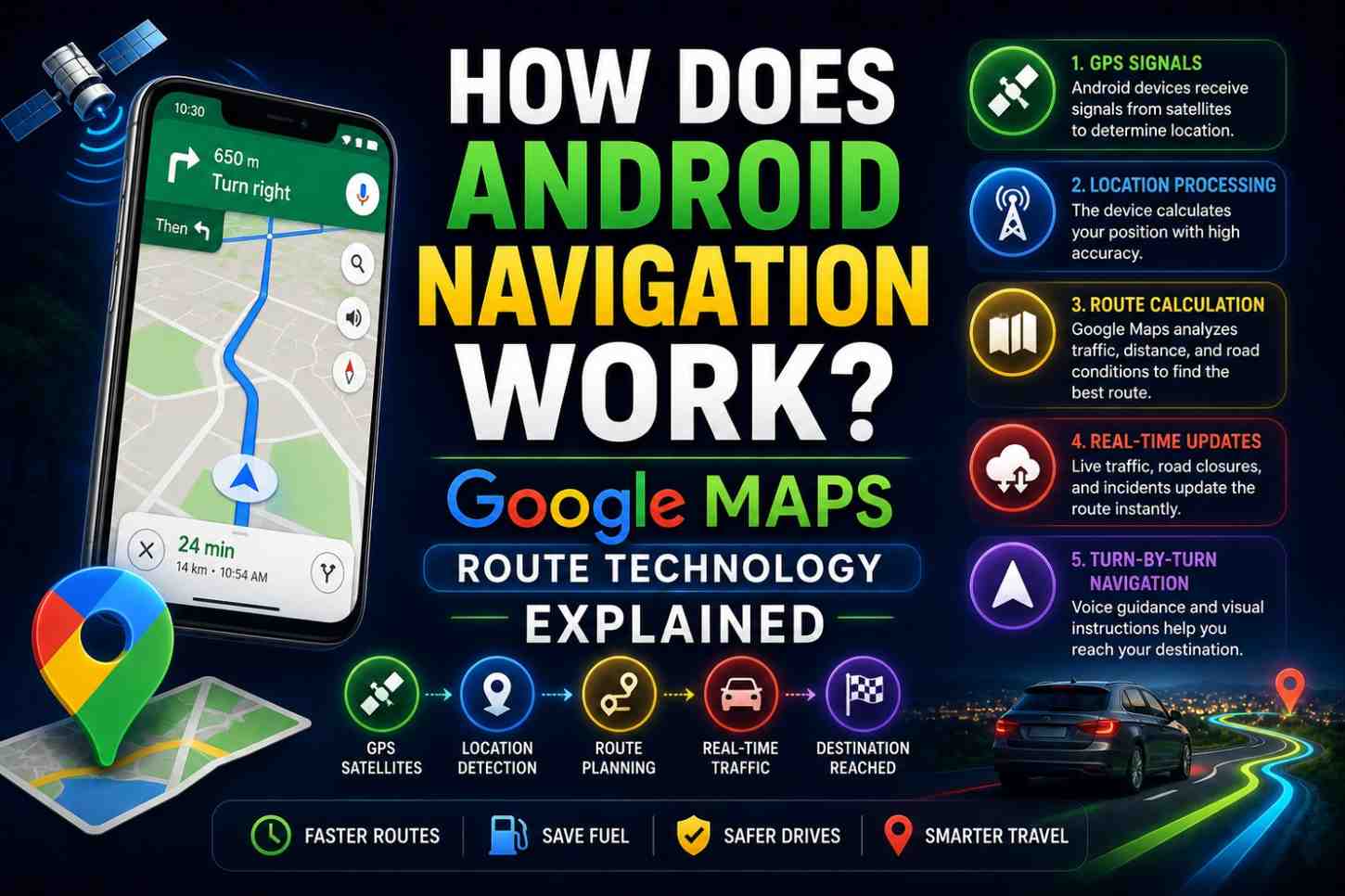
How Does Android Navigation Work? The Route Calculation Process
Step 1: Destination Geocoding
When you type an address or place name, Google Maps performs geocoding—converting the text into geographic coordinates (latitude/longitude).
This requires an internet connection and access to Google’s Places database—containing the mapped positions of hundreds of millions of locations worldwide, including businesses, addresses, landmarks, and custom pins.
Step 2: Road Network Graph Construction
Routing happens on a graph data structure—a mathematical model of the road network where
- Nodes represent intersections, turns, and points of interest
- Edges represent road segments between nodes
- Edge weights represent the time (not distance) to travel each segment
Google’s road graph is built from:
- Government road databases
- Street View camera data
- User-contributed corrections
- Satellite and aerial imagery analysis
- Ground truth from billions of navigation sessions
The graph for a major city contains millions of nodes and edges.
Step 3: Traffic-Weighted Routing Algorithm
Raw road data is not enough. Google Maps adjusts each edge weight dynamically using real-time and predictive traffic data:
Real-time traffic sources:
- Anonymized speed data from Android devices currently on those roads
- Traffic cameras and sensor networks
- Road closure and incident reports
- Police and emergency service feeds
Predictive traffic:
- Historical speed patterns for the specific road at the specific time of day and day of week
- Machine learning models that predict traffic 60–90 minutes ahead
- Event-based predictions (sports games, concerts, rush hour)
Step 4: Dijkstra and A* Algorithm Routing
Google Maps uses variants of classic graph routing algorithms to find the optimal path:
Dijkstra’s Algorithm—finds the shortest path between two nodes in a weighted graph by systematically exploring the least-costly paths first. Pure Dijkstra is computationally expensive for large road networks.
An algorithm*—an optimized version that uses a heuristic (an estimate of remaining distance to destination) to explore more promising paths first, dramatically reducing computation time.
Contraction Hierarchies — Google Maps uses this advanced technique, which preprocesses the road network to create “shortcuts” for long-distance routing, enabling real-time route calculation across continent-scale road networks in milliseconds.
Step 5: Multi-Route Generation
Google Maps calculates and displays multiple route options—typically 3 alternatives. Each option balances:
- Travel time (primary optimization target)
- Distance (secondary)
- Known road preferences (avoiding tolls, highways, ferries—if configured)
- Predicted congestion at the estimated time of arrival on each road segment
Step 6: Turn-by-Turn Instruction Generation
Once a route is selected, Google’s backend generates turn-by-turn navigation instructions—human-readable directions corresponding to each maneuver along the route.
These instructions are:
- Generated in your device’s language
- Calibrated to appropriate specificity (simple turns vs. complex multi-lane highway merges)
- Timed for delivery based on your speed and distance from each maneuver
- Vocalized through Android’s text-to-speech engine
Real-Time Route Recalculation
A critical feature of Android navigation is continuous route recalculation. Google Maps monitors your actual movement and instantly recalculates if you:
- Miss a turn
- Take a different road
- Encounter a newly formed traffic jam
- Drive faster or slower than predicted
Recalculation happens on Google’s cloud servers—not locally on your phone—giving Maps access to the full real-time traffic graph. New routes are delivered to your phone in under two seconds in most cases.
How Google Maps Uses Crowdsourced Data
A major secret behind how Android navigation works so well is crowdsourcing. With hundreds of millions of Android users running Google Maps, Google collects (with permission):
- Anonymized speed data—how fast devices are moving on each road segment
- Traffic density—how many devices are on each road at each time
- Stop detections—identifying new traffic lights, stop signs, and speed bumps from braking patterns
- Business hours verification—detecting when businesses are actually open from user visits
- User-submitted reports—accidents, road closures, speed cameras, and police presence
This crowdsourced data is what makes Google Maps’ real-time traffic so dramatically more accurate than competing services. The more users, the better the data—a powerful network effect.
Android Auto and Navigation Integration
Android Auto extends Google Maps navigation to your car’s dashboard display with an optimized interface for driving:
- Larger map and text for in-car viewing
- Steering wheel and touchscreen control integration
- Car’s GPS antenna integration (typically better signal than phone antenna in dashboards)
- Integration with car speakers for higher-quality voice guidance
- EV range planning with charging stop integration (2024–2026 feature)
Offline Navigation on Android
Android navigation supports offline mode for areas without internet connectivity:
- Pre-download map regions via Google Maps settings
- Downloaded maps include road network, POI data, and routing capability
- Turn-by-turn navigation works fully offline on downloaded areas
- Real-time traffic and dynamic rerouting require internet
Battery Optimization in Android Navigation
Navigation is one of the most battery-intensive phone activities—primarily due to the screen, not the GPS chip. Android strategies to extend battery during navigation:
- Screen dimming—automatically reduces brightness after inactivity
- Battery saver navigation mode—reduces GPS update frequency slightly
- Cached map tiles—reduces data fetching for known routes
- Background processing—offloads route calculations to cloud servers
FAQs: How Does Android Navigation Work
Q1: How does Android navigation calculate the best route? Google Maps uses traffic-weighted graph routing algorithms (A* and Contraction Hierarchies) applied to a real-time road network graph updated continuously from crowdsourced GPS data.
Q2: How does Google Maps know about traffic jams in real time? It aggregates anonymized speed data from millions of Android devices running Google Maps, combined with traffic sensor feeds and user-submitted reports.
Q3: Does Android navigation work without a data connection? Turn-by-turn navigation on pre-downloaded offline maps works without the internet. Real-time traffic and dynamic rerouting require a data connection.
Q4: How does Google Maps know to recalculate when I miss a turn? It continuously compares your GPS position to the planned route. When your position diverges from the route, recalculation triggers automatically, typically within 3–5 seconds.
Q5: Is Google Maps navigation better than Apple Maps on Android? Google Maps is not available natively on iOS but is available as an app. On Android, Google Maps benefits from deeper OS integration through the Fused Location Provider.
Q6: How does Android navigation handle multiple stops? Google Maps supports multi-stop routing. You can add up to 9 waypoints to a route, and Maps optimizes the order to minimize total travel time.
Conclusion
Understanding how Android navigation work reveals a remarkable real-time system—where satellite signals, sensor fusion, cloud routing algorithms, and crowdsourced traffic data combine to guide hundreds of millions of people every single day. Every route you navigate contributes anonymously to making the system smarter for every other user. To get the most from Android navigation, keep your Google Maps app updated, enable all location sources, and explore offline map downloads for your regular travel areas at Google Maps offline support. For developer-level exploration of Android’s location APIs, visit Android Location Developer Documentation.