Introduction
Before any web page can appear in Google search results, it must first be discovered. That discovery process is called “web crawling“—and it is the foundational first step of how every search engine operates. But what is web crawling, and how does it work in practice?
Imagine trying to catalog every book in a library that adds millions of new books every day while simultaneously updating the existing ones. That is essentially what web crawlers do—but at a scale spanning the entire internet. In this guide, we break down everything you need to know about web crawling, why it matters for your website, and how to ensure your pages get crawled and discovered properly.
Also Read: How Does Google Search Work? The Complete Process Behind Every Result in 2026
What Is Web Crawling? A Clear Definition
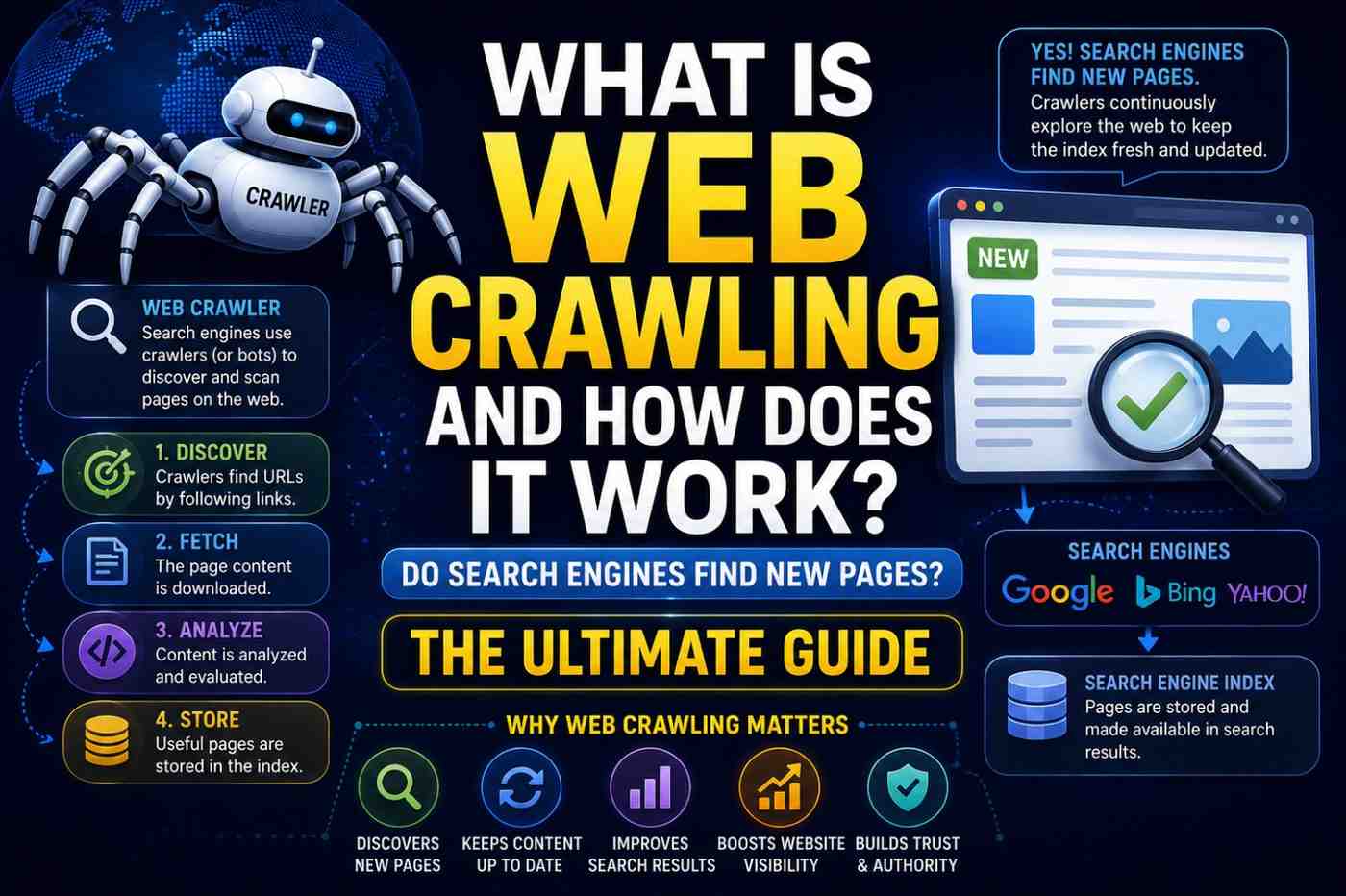
Web crawling is the automated process by which search engine programs—called crawlers, bots, or spiders—systematically browse the internet to discover and read web pages.
These bots follow hyperlinks from page to page, downloading and analyzing the content, HTML structure, and links of each page they visit. The data collected is then passed to the search engine’s indexing system.
Web crawling is the internet’s equivalent of a scout—exploring new territory and reporting back what it finds.
What Is Web Crawling and How Does It Work? The Full Process
Step 1: The URL Frontier (Seed URLs)
The crawler begins with a list of known URLs called the URL frontier or seed list. These include:
- Previously indexed pages
- Submitted XML sitemaps
- URLs discovered from other crawled pages
- Manually submitted URLs via Google Search Console
Step 2: Fetching Pages
The crawler sends an HTTP request to each URL, just like a browser loading a page. The server responds with the page’s content—HTML, CSS, JavaScript, and other assets.
Step 3: Parsing and Link Extraction
Once the page is downloaded, the crawler parses its content to:
- Read text, headings, and metadata
- Identify all hyperlinks on the page
- Extract structured data (Schema markup)
- Detect the language and content type
Every link found on the page becomes a new candidate URL to add to the frontier.
Step 4: Following Links
This is the recursive heart of web crawling. By following links from page to page, a crawler can theoretically reach every publicly accessible page on the internet—as long as each page is linked from somewhere.
This is why internal linking is so crucial for SEO. Pages that are not linked from anywhere else are called orphan pages and are much less likely to be crawled.
Step 5: Respecting Rules
Before crawling a page, well-behaved bots check the site’s robots.txt file—a text file that instructs crawlers which pages they are and are not allowed to access.
For example:
User-agent: Googlebot
Disallow: /private/
Allow: /
This tells Googlebot to crawl everything except the /private/ folder.
Step 6: Scheduling Recrawls
Crawling is not a one-time event. Search engines continuously recrawl pages to detect changes, new content, and removed pages.
Recrawl frequency is determined by:
- Page change frequency—A news site gets recrawled hourly; a static brochure site monthly
- Page authority—High-authority pages get recrawled more often
- Crawl budget—Each site gets allocated a certain number of crawls per day
Googlebot: The World’s Most Important Crawler
Googlebot is Google’s primary web crawler and the most important one to understand when optimizing your site. Key facts:
- Googlebot primarily uses a mobile smartphone user agent since Google switched to mobile-first indexing
- It identifies itself with a specific user agent string that can be verified via reverse DNS lookup
- It follows your robots.txt instructions and respects noindex tags
- It does not crawl pages behind login walls or requiring JavaScript-only interactions that cannot be rendered
Google also operates specialized crawlers, including Googlebot-Image, Googlebot-Video, and Google-InspectionTool (used by Search Console’s URL Inspection Tool).
Crawl Budget: Why It Matters for Large Websites
Crawl budget is the number of pages. Googlebot will crawl on your site within a given time period. For small websites (under 1,000 pages), crawl budget is rarely a concern. For large e-commerce sites, news sites, or enterprise websites with millions of pages, it becomes critical.
Crawl budget is wasted on:
- Duplicate content (multiple URLs for the same page)
- Low-quality or thin pages
- Redirect chains (A → B → C → D)
- URLs with parameters that create infinite variations
- Soft 404 pages (pages that return 200 status but have no real content)
Optimizing your crawl budget ensures Googlebot spends its time on your most valuable pages.
Common Crawling Issues and How to Fix Them
| Issue | Cause | Fix |
|---|---|---|
| Pages not being crawled | Blocked in robots.txt | Review and update robots.txt |
| Orphan pages | No internal links pointing to them | Add links from relevant pages |
| Crawl budget waste | Duplicate URLs | Implement canonical tags |
| Slow crawl rate | Server response too slow | Improve server performance |
| JavaScript not rendered | Complex JS framework | Implement server-side rendering |
| Infinite crawl loops | Dynamic parameters | Use URL parameter handling in Search Console |
How to Help Search Engines Crawl Your Site Better
Understanding what web crawling is and how it works gives you the tools to optimize your site for better crawlability:
- Submit an XML sitemap via Google Search Console and Bing Webmaster Tools
- Create a logical site structure with clear internal linking
- Fix broken links (404 errors) that waste crawl budget
- Avoid redirect chains—redirect directly from the original URL to the final destination
- Improve page load speed—slow servers get fewer crawl visits
- Use canonical tags to indicate your preferred URL for duplicate content
- Check robots.txt regularly—accidental blocks are a common cause of missing rankings
Beyond Search Engines: Other Types of Web Crawlers
While Googlebot is the most important crawler for SEO purposes, web crawling technology is used for many other purposes:
- Price comparison sites—crawl e-commerce sites to compare product prices
- Security scanners—crawl sites looking for vulnerabilities
- Research crawlers—academic institutions crawl the web for research purposes
- Archiving bots—the Internet Archive’s crawler saves snapshots of web pages
- SEO tools—Screaming Frog, Ahrefs, and Semrush crawl sites for analysis
Most reputable crawlers identify themselves and respect robots. txt. Malicious scrapers often do not.
FAQs: What Is Web Crawling and How Does It Work
Q1: What is web crawling in simple terms? Web crawling is the automated process search engine bots use to browse the internet, read web pages, and discover new content to add to their search index.
Q2: How often does Google crawl my website? It varies by site authority and content freshness. High-authority sites or frequently updated pages may be crawled daily. Small static sites might be crawled monthly.
Q3: Can I stop Google from crawling my website? Yes. Use a robots.txt file to block Googlebot from specific pages or your entire site. Note that blocking crawling is different from blocking indexing.
Q4: What is the difference between crawling and indexing? Crawling is the discovery and reading of web pages. Indexing is storing that information in the search engine’s database so it can appear in search results.
Q5: What is a crawl budget, and how do I optimize it? Crawl budget is the number of pages Google crawls on your site per day. Optimize it by removing low-quality pages, fixing redirects, and eliminating duplicate content.
Q6: How can I check if Googlebot has crawled my pages? Use the URL Inspection Tool in Google Search Console to see the last crawl date and how Googlebot sees your page.
Conclusion
Now you have a thorough answer to what web crawling is and how it works. Crawling is the invisible foundation of every search engine—the tireless, automated process that makes web discovery possible. By optimizing your site for efficient crawling, you give your content the best possible chance of being indexed and ranked. Start today by auditing your robots.txt file and submitting a fresh sitemap to Google Search Console. Every great search ranking begins with a successful crawl.