Introduction
Every second, thousands of malicious attempts target your device and network. A firewall stands as your first and most important line of digital defense. But what is a firewall and how does it work to keep you safe? Many people think of firewalls as mysterious security tools, yet understanding their fundamental principles makes you a smarter internet user. This comprehensive guide explains what a firewall is, reveals how it works to protect your internet connection, covers different firewall types, and provides practical strategies for maximizing your security. Whether you’re protecting a home network or managing business infrastructure, this article equips you with essential firewall knowledge.
What Is a Firewall?
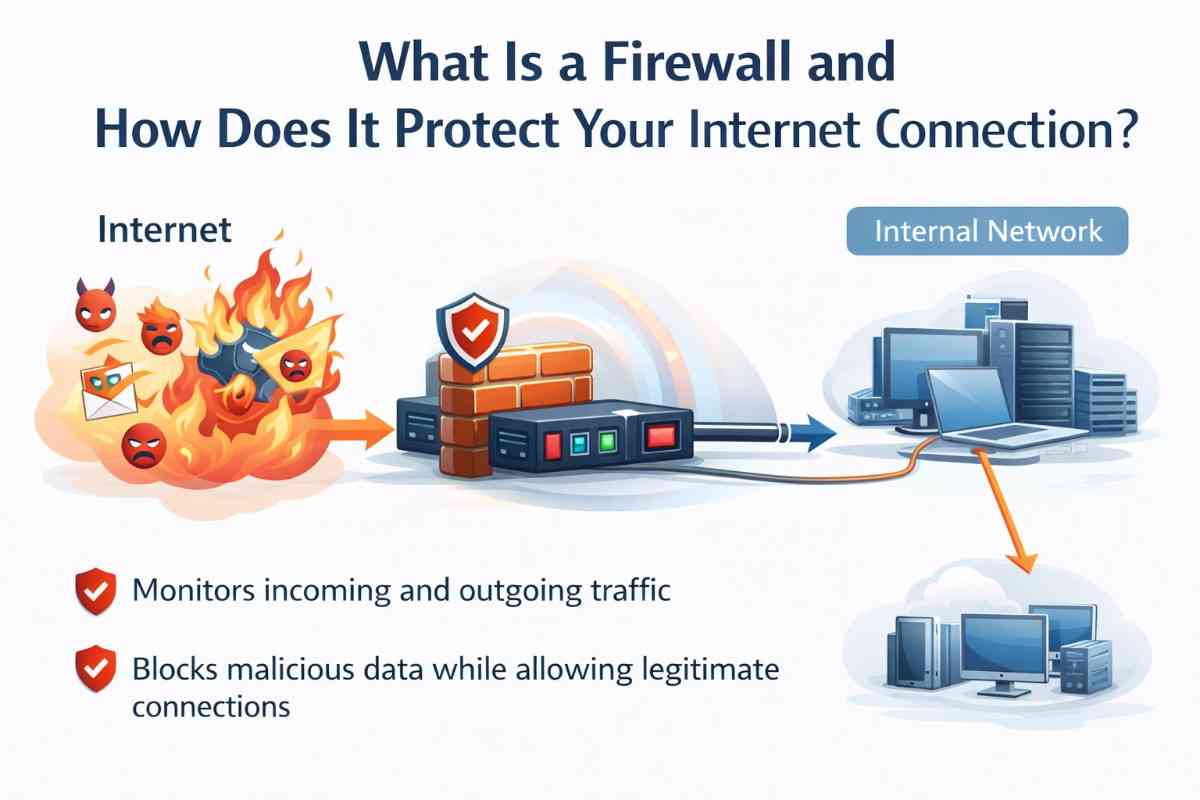
A firewall is a network security system that monitors and controls incoming and outgoing network traffic based on predetermined security rules.
The Core Definition
Think of a firewall as a digital gatekeeper standing between your devices and the internet. It examines every data packet attempting to enter or leave your network, decides whether to allow or block it based on rules you’ve established, and logs suspicious activity for review.
Why Firewalls Matter
- Threat prevention: Blocks unauthorized access attempts and malicious traffic
- Malware protection: Stops known malicious software from entering your network
- Privacy preservation: Prevents unwanted data from leaving your devices
- Network monitoring: Alerts you to suspicious activities in real-time
- Compliance assurance: Helps meet regulatory requirements for businesses
- Attack mitigation: Reduces impact of cyberattacks and ransomware
Historical Context
Firewalls emerged in the late 1980s as internet growth created security challenges. The earliest firewalls were simple, filtering traffic based on IP addresses and ports. Modern firewalls use sophisticated artificial intelligence and machine learning to detect previously unknown threats.
How Does a Firewall Work? The Complete Process
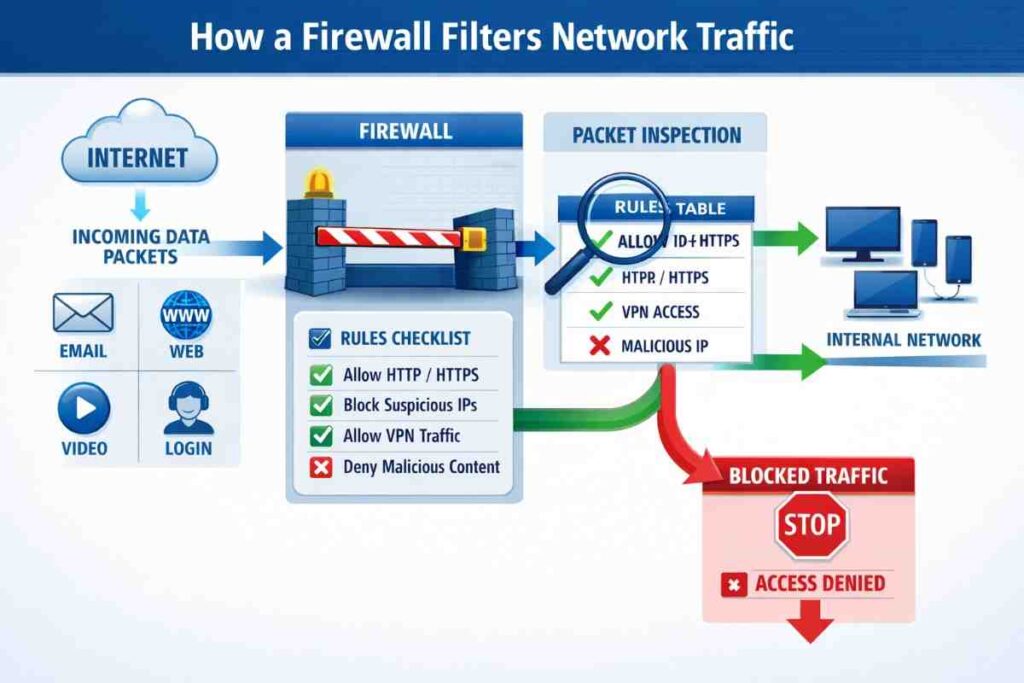
Understanding firewall mechanics reveals why they’re indispensable for modern security.
The Basic Filtering Mechanism
Every data packet traveling across networks contains information:
- Source IP address (where it comes from)
- Destination IP address (where it goes)
- Port number (which application it targets)
- Protocol type (TCP, UDP, ICMP, etc.)
- Data payload (the actual content)
Your firewall examines each packet against your security rules and makes a split-second decision: allow, block, or quarantine.
The Decision-Making Process
Step 1: Packet Arrival
A data packet attempts to cross your network boundary. The firewall immediately intercepts it before it reaches your devices.
Step 2: Rule Checking
The firewall compares the packet against your security rules in sequential order. Rules typically follow a first-match-wins logic—the first matching rule determines the packet’s fate.
Step 3: Rule Evaluation
Each rule contains:
- Source identification: Allowed or blocked IP addresses
- Destination specification: Target network or device
- Port restrictions: Which ports are accessible
- Protocol filtering: Which communication types are allowed
- Action: Allow, block, or log
Step 4: Action Execution
Based on matching rules:
- Allow: Packet passes through to intended destination
- Block: Packet is discarded silently (stealth mode)
- Reject: Packet is blocked with notification sent to sender
- Quarantine: Suspicious packet is isolated for analysis
- Log: Event is recorded for security monitoring
Step 5: Continuous Monitoring
Modern firewalls don’t just stop at rule matching. They analyze packet content, detect patterns, and use machine learning to identify zero-day attacks (previously unknown threats).
Real-World Example
Imagine an attempt to access your computer from an unknown internet address on port 3389 (Remote Desktop Protocol):
- Firewall receives the incoming connection request
- Checks against your rules: “Block all incoming Remote Desktop attempts”
- Rule matches the incoming traffic
- Firewall blocks the connection silently
- Logs the event for your review
- Attacker receives no response (cannot determine if target exists)
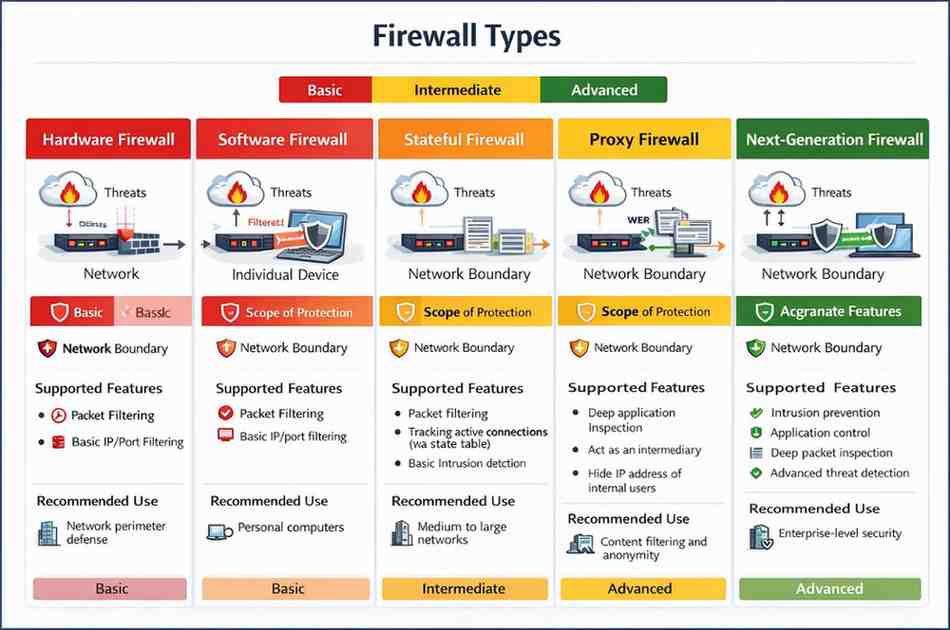
Types of Firewalls: Finding Your Security Match
Different firewall types offer varying levels of protection and complexity.
Hardware Firewalls
What They Are: Physical devices installed between your modem and network
How They Work: Protect entire networks by filtering traffic at the entry point
Advantages:
- Protects all connected devices simultaneously
- Single point of management for organizations
- Blocks threats before reaching any device
- Reduced load on individual device resources
- Ideal for businesses and larger networks
Disadvantages:
- Higher cost ($200-$2,000+)
- Requires technical expertise to configure
- Single point of failure if device malfunctions
- May limit some legitimate traffic
Best For: Home networks with multiple devices, small businesses, organizations requiring centralized security
Software Firewalls
What They Are: Programs installed on individual devices
How They Work: Monitor traffic specific to that device, examining applications and their internet access
Advantages:
- Affordable (often included free with operating systems)
- Easy to install and configure
- Device-specific control and monitoring
- Minimal hardware requirements
- Can block specific applications from accessing internet
Disadvantages:
- Only protects that individual device
- Requires installation on every device
- Consumes device processing power and RAM
- Malware might disable protection if device is compromised
- Harder to manage across multiple devices
Best For: Individual users, laptop/desktop protection, remote workers, supplementary security layer
Stateful Firewalls
What They Are: Intelligent firewalls that track connection states
How They Work: Remember legitimate connections and allow responses to trusted connections while blocking suspicious ones
Key Features:
- Track active connections in real-time
- Understand connection context and legitimacy
- More sophisticated than simple packet filtering
- Industry standard for modern networks
Best For: Most modern deployments requiring intelligent traffic analysis
Proxy Firewalls
What They Are: Intermediary services that handle all client-server communication
How They Work: Act as middlemen between your devices and internet services, inspecting all content
Key Features:
- Deep content inspection and filtering
- Can block malicious files and websites
- Hides internal network structure
- Can cache content for performance
- Can enforce acceptable use policies
Best For: Organizations needing content filtering and web monitoring, enterprise environments
Packet-Filtering Firewalls
What They Are: Basic firewalls that inspect individual packets
How They Work: Analyze packet headers without understanding content context
Key Features:
- Fastest performance
- Minimal resource consumption
- Limited intelligence about threats
- Can block by IP, port, and protocol
Best For: High-performance networks with basic security needs
Next-Generation Firewalls (NGFW)
What They Are: Advanced firewalls combining multiple security technologies
How They Work: Combine packet filtering, stateful inspection, deep packet inspection, intrusion prevention, and application awareness
Key Features:
- Artificial intelligence-based threat detection
- Application-level filtering (block specific apps, not just ports)
- Intrusion detection and prevention
- Antivirus and anti-malware integration
- VPN support and encryption
- Advanced threat protection
Best For: Organizations handling sensitive data, businesses facing sophisticated attackers, compliance-heavy industries
Firewall Rules and How They Protect You
Understanding firewall rules reveals how firewalls achieve protection.
Common Firewall Rules
1. Default Deny (Implicit Deny)
Most secure approach: Block everything by default, allow only explicitly approved traffic.
Example: “Block all incoming connections except Port 80 (HTTP) and Port 443 (HTTPS)”
2. Port-Based Rules
Control access based on port numbers (known entry points for services)
| Port | Service | Default Rule |
|---|---|---|
| 80 | HTTP (Web) | Usually Allow |
| 443 | HTTPS (Secure Web) | Usually Allow |
| 22 | SSH (Remote Access) | Usually Block |
| 3389 | RDP (Remote Desktop) | Usually Block |
| 21 | FTP (File Transfer) | Usually Block |
| 25 | SMTP (Email) | Usually Block |
| 53 | DNS (Domain Names) | Usually Allow |
3. IP-Based Rules
Allow or block specific IP addresses or entire address ranges
Example: “Block all traffic from IP range 192.168.1.50-192.168.1.100”
4. Application-Based Rules
Modern firewalls can block specific applications regardless of port
Example: “Block access to social media applications during work hours”
5. Protocol-Based Rules
Control specific communication protocols
Example: “Allow TCP but block UDP (used by some malware)”
6. Outbound Rules
Control what data leaves your network
Example: “Block all outbound traffic to known malware command-and-control servers”
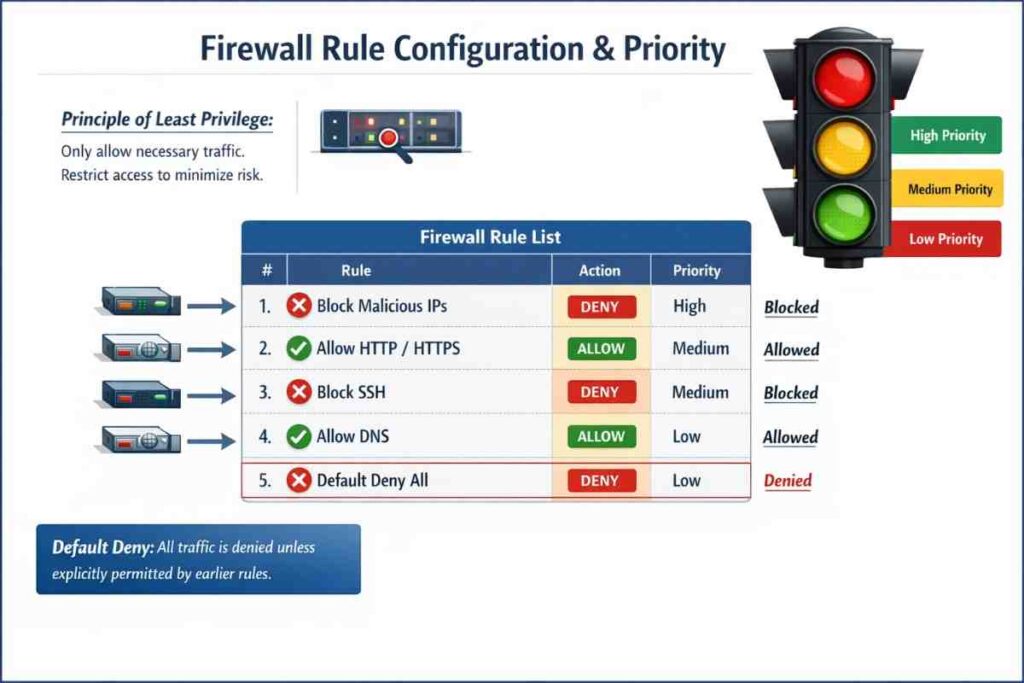
Rule Priority and Order
Firewall rules process in order—first matching rule wins. A properly configured firewall has rules arranged strategically:
- Highest priority: Block known malicious IP ranges and ports
- Medium priority: Allow legitimate business traffic
- Lower priority: Allow web browsing
- Lowest priority: Implicit deny rule (catches everything else)
How Firewalls Detect and Block Threats
Modern firewalls employ multiple detection techniques beyond simple rule matching.
Signature-Based Detection
How It Works: Firewalls maintain databases of known malware signatures (unique fingerprints)
Analogy: Like a police database matching criminal mugshots
Strengths:
- Very accurate for known threats
- Fast detection and blocking
- Low false-positive rate
Weaknesses:
- Cannot detect new, unknown threats (zero-days)
- Database must be constantly updated
Anomaly-Based Detection
How It Works: Firewalls learn normal traffic patterns and alert when unusual activity occurs
Analogy: A security guard who knows every employee’s schedule notices strangers
Strengths:
- Can detect unknown threats
- Identifies unusual behavior patterns
- Effective against zero-day attacks
Weaknesses:
- Higher false-positive rates
- Requires extended observation period
- More resource intensive
Machine Learning Detection
How It Works: Artificial intelligence analyzes millions of traffic patterns to identify threats
Capabilities:
- Identifies sophisticated attacks humans might miss
- Improves continuously with new data
- Detects behavior-based threats
- Adapts to new attack variations
Example: AI detects that a user account is downloading 1,000 files in seconds (abnormal behavior) and blocks it even though individual files appear harmless.
Behavioral Analysis
How It Works: Monitors how programs and users act, looking for suspicious patterns
Detects:
- Ransomware attempting to encrypt files
- Malware communicating with command-and-control servers
- Unusual login locations or times
- Brute-force password attacks
Firewall Configuration: Rules for Maximum Protection
Essential Inbound Rules (Traffic Entering Your Network)
What to Block:
- Unnecessary incoming connection attempts
- Traffic from known malicious IP addresses
- Port scanning attempts (multiple port connection attempts)
- Suspicious protocols
- Spoofed traffic (fake source addresses)
What to Allow:
- Web traffic (HTTP/HTTPS)
- Email traffic if needed
- Remote access only from known IPs
- DNS queries for domain resolution
- NTP for time synchronization
Essential Outbound Rules (Traffic Leaving Your Network)
What to Block:
- Connections to known malware command servers
- Unusual ports not needed for legitimate services
- Traffic from malware-infected systems
- Excessive data transfers to unknown destinations
- Encrypted traffic to suspicious destinations
What to Allow:
- Web traffic to legitimate websites
- Email transmission
- Software updates and patches
- DNS queries
- Business-critical applications
Best Practice Configuration
- Default Deny Stance: Block everything unless explicitly allowed
- Principle of Least Privilege: Only allow minimum necessary access
- Regular Auditing: Review rules quarterly, remove unused rules
- Documentation: Record reason for each rule’s existence
- Logging Enabled: Monitor all blocked attempts and suspicious activity
- Update Regularly: Keep firewall firmware and threat signatures current
Firewalls vs. Other Security Tools
Understanding how firewalls fit within broader security strategy matters.
Firewall vs. Antivirus
| Aspect | Firewall | Antivirus |
|---|---|---|
| Protection Type | Network access control | Malware detection |
| Works At | Network boundary | Individual device |
| Detects | Unauthorized connections | Infected files |
| Blocks | Incoming/outgoing traffic | Malicious programs |
| Effectiveness | Prevents external attacks | Prevents internal infection |
| Needed? | Yes, always essential | Yes, always necessary |
Conclusion: Both are essential—firewalls prevent attacks from reaching you, antivirus removes malware if it gets through.
Firewall vs. VPN
A common misconception: firewalls and VPNs serve different purposes.
- Firewalls: Control traffic access at network boundaries
- VPNs: Encrypt data traveling through the internet
They’re complementary—use both for comprehensive protection.
Firewall vs. Intrusion Detection System (IDS)
- Firewalls: Block traffic based on rules
- IDS: Detect attacks and alert you
- IPS (Intrusion Prevention): Detects AND blocks attacks
Modern NGFWs integrate IPS capabilities.
Pros and Cons of Firewalls
Advantages
✓ Essential protection: Blocks unauthorized access attempts
✓ Malware prevention: Stops known malicious traffic
✓ Privacy protection: Prevents unwanted outbound data leaks
✓ Attack visibility: Logs show attack attempts and patterns
✓ Centralized control: Hardware firewalls protect entire networks
✓ Compliance support: Helps meet security regulations
✓ Low cost: Software firewalls are often free
✓ Minimal performance impact: Modern firewalls optimized for speed
Disadvantages
✗ Configuration complexity: Requires expertise to set up correctly
✗ Legitimate traffic blocking: Incorrectly configured rules block valid access
✗ False sense of security: Firewalls aren’t complete protection
✗ Insider threats: Cannot stop attacks from within network
✗ Zero-day vulnerabilities: Cannot block previously unknown threats
✗ Maintenance overhead: Rules require regular updates and auditing
✗ Performance impact: Some firewalls slightly reduce connection speed
✗ Initial cost: Quality hardware firewalls expensive for small businesses
Latest Firewall Technology Trends (2024-2026)
AI-Powered Threat Detection
Artificial intelligence now identifies and blocks threats in milliseconds, recognizing attack patterns humans cannot detect. These systems improve continuously without manual updates.
Zero-Trust Architecture
Modern firewalls implement “never trust, always verify” principles:
- Verify every user identity
- Check device compliance
- Validate application legitimacy
- Inspect every transaction
- Traditional perimeter protection is gone
Cloud-Native Firewalls
As businesses migrate to cloud infrastructure, firewalls evolve:
- Protect cloud applications and data
- Monitor microservices communication
- Secure containerized environments
- Integrate with cloud platforms seamlessly
Secure Web Gateway Integration
Advanced firewalls now include:
- Real-time website reputation scoring
- Phishing site detection and blocking
- Ransomware-as-a-Service (RaaS) blocking
- Data loss prevention (DLP)
- SSL/TLS inspection for encrypted traffic
IoT Device Management
Firewalls increasingly handle Internet of Things security:
- Segment IoT traffic from critical systems
- Block unauthorized IoT device communication
- Detect compromised smart home devices
- Prevent botnet attacks using connected devices
Automated Threat Response
Modern firewalls automatically respond to detected threats:
- Immediately block malicious IPs
- Isolate compromised devices
- Quarantine suspicious files
- Generate incident reports automatically
Expert Tips for Maximum Firewall Protection
Regular Security Audits
Quarterly Tasks:
- Review active firewall rules for relevance
- Remove or update outdated rules
- Check firewall logs for unusual patterns
- Verify threat signature databases are current
- Test firewall responsiveness to threats
Logging and Monitoring
Enable Comprehensive Logging:
- All blocked connections
- Repeated connection attempts (indicates scanning)
- Unusual outbound traffic
- Changes to firewall configuration
- Failed authentication attempts
Monitor Actively:
- Review logs daily for small businesses
- Use SIEM (Security Information and Event Management) for enterprises
- Set up alerts for high-severity events
- Analyze patterns to identify trends
Layered Defense Strategy
Don’t rely on firewalls alone:
- Firewall Layer: Hardware firewall at network boundary
- Device Layer: Software firewalls on each device
- Application Layer: Firewalls built into applications
- Data Layer: Encryption protecting sensitive information
- User Layer: Security awareness training for employees
Configuration Best Practices
Initial Setup:
- Default deny all, allow only necessary traffic
- Document every rule with business justification
- Use clear naming conventions for rules
- Implement least privilege principle
- Test rules before deployment
Ongoing Maintenance:
- Update firmware monthly
- Test backup configurations quarterly
- Archive old rules for audit trails
- Update threat signatures weekly
- Conduct annual security assessments
Testing Your Firewall
Regular Testing Methods:
- Port Scanning: Use tools like Nmap to identify open ports
- Penetration Testing: Simulate attacks to find weaknesses
- Vulnerability Scanning: Regular automated security assessments
- Log Analysis: Review what your firewall is blocking
- Third-Party Audits: Professional security evaluations
Frequently Asked Questions
What is a firewall and how does it work in simple terms?
A firewall is a digital gatekeeper that examines all information traveling to and from your internet connection. It compares each piece of data against security rules you’ve set and decides whether to allow or block it. Think of it like a bouncer at a club—it checks credentials (rules) and only lets in legitimate traffic while keeping out unwanted visitors (malicious data).
Can a firewall prevent all cyberattacks?
No, firewalls are your first line of defense but not complete protection. They block unauthorized network access and known threats, but cannot prevent all attacks. Sophisticated attacks, insider threats, compromised user credentials, and zero-day exploits can bypass firewalls. Firewalls work best as part of a comprehensive security strategy including antivirus software, strong passwords, software updates, and user awareness training.
Do I need both hardware and software firewalls?
Ideally, yes. Hardware firewalls protect your entire network at the entry point, while software firewalls protect individual devices. Many networks use both for defense-in-depth. However, if budget is limited, prioritize a hardware firewall for your network entry point, which protects all devices simultaneously.
Why do firewalls sometimes block legitimate connections?
Misconfigured firewall rules can block legitimate traffic. Rules may be too restrictive, outdated, or incorrectly prioritized. If your firewall blocks legitimate services, review your rules, ensure necessary ports are open, and check if the application requires specific firewall exceptions. Some software installations automatically request firewall access—allow these when you trust the application source.
How often should I update my firewall?
Update firewall firmware monthly and threat signature databases weekly (most modern firewalls do this automatically). Review firewall rules quarterly to remove outdated entries and ensure they still serve legitimate purposes. Annually, conduct comprehensive security audits with professional penetration testing. Staying current with updates closes security vulnerabilities and ensures your firewall protects against the latest threats.
What’s the difference between blocking and rejecting traffic?
Blocking (silent drop): Firewall discards packets without response. The sender doesn’t know if the system exists or if the connection was blocked—more secure as it doesn’t reveal information.
Rejecting: Firewall sends a response (ICMP “unreachable” message) informing the sender the connection was refused. Less stealthy but sometimes necessary for services requiring feedback that connections were attempted.
Conclusion
A firewall is an indispensable security component that stands guard between your devices and the threats lurking on the internet. Understanding what a firewall is and how it works to protect your internet connection empowers you to make informed security decisions. Firewalls examine data packets against security rules, blocking unauthorized access while allowing legitimate traffic—all in milliseconds.
Whether you choose a hardware firewall for your home network, rely on your operating system’s built-in software firewall, or deploy enterprise-grade next-generation firewalls, proper configuration and maintenance are essential. Combine firewall protection with antivirus software, strong passwords, software updates, and user awareness training for comprehensive security.
Take action today: If you don’t have a hardware firewall, consider installing one at your network entry point. Review your firewall rules to ensure they reflect your current needs. Enable logging and regularly check firewall events for suspicious activity. Remember, firewalls are continuously improving with artificial intelligence and machine learning—staying updated ensures you benefit from the latest protection technologies.
Your internet connection deserves protection, and your firewall is the strongest tool available to keep threats at bay.