
Introduction
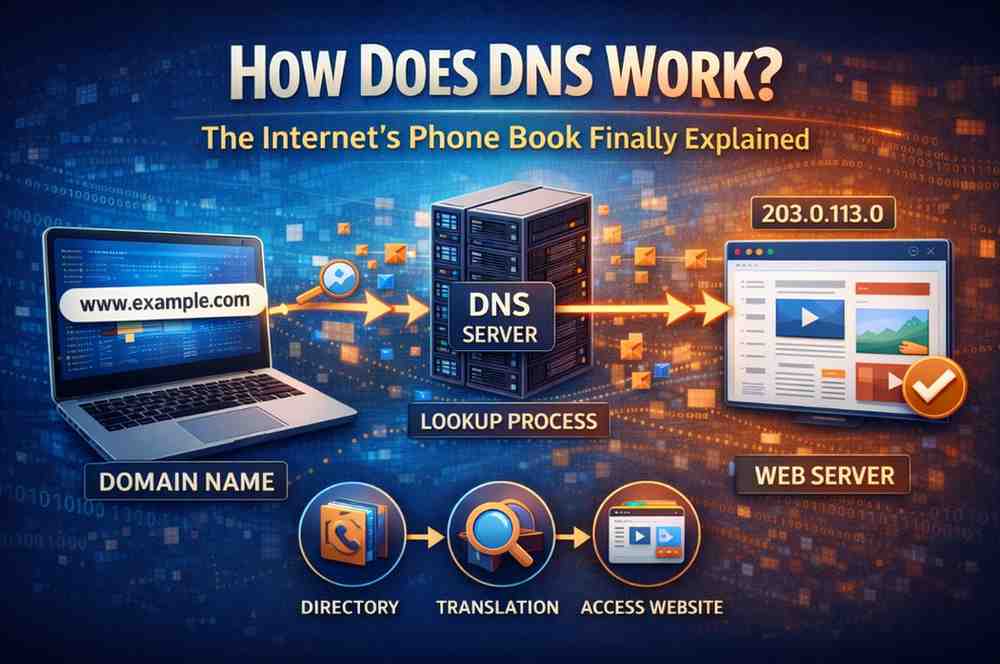
Have you ever typed a website name and wondered what happens before the page loads? In that fraction of a second, your device performs an invisible but remarkable process — all powered by DNS. But how does DNS work, exactly?
DNS stands for Domain Name System. It is often called “the internet’s phone book” because it translates easy-to-remember website names like google.com into numerical IP addresses like 142.250.190.46 that computers actually use. Without DNS, you would need to memorize a unique string of numbers for every website you visit.
This article breaks down how DNS works into simple, easy-to-follow steps — no technical background required. You will learn what DNS is, how it resolves domain names, what DNS records do, and how DNS affects your privacy and security every day.
What Is DNS? The Basics
DNS stands for Domain Name System. It is a global, distributed directory that connects domain names to their corresponding IP addresses. Every device on the internet — your phone, laptop, smart TV, and web server — is identified by a unique IP address. DNS makes it possible to use human-friendly names instead of those numbers.
Think of DNS as your smartphone’s contact list. When you want to call a friend, you tap their name — you don’t dial their number from memory. DNS does the same thing for the internet: you type a name, and DNS finds the number behind it.
Key Components of DNS:
- Domain Name: The human-readable address (e.g., www.example.com)
- IP Address: The numerical address computers use (e.g., 93.184.216.34)
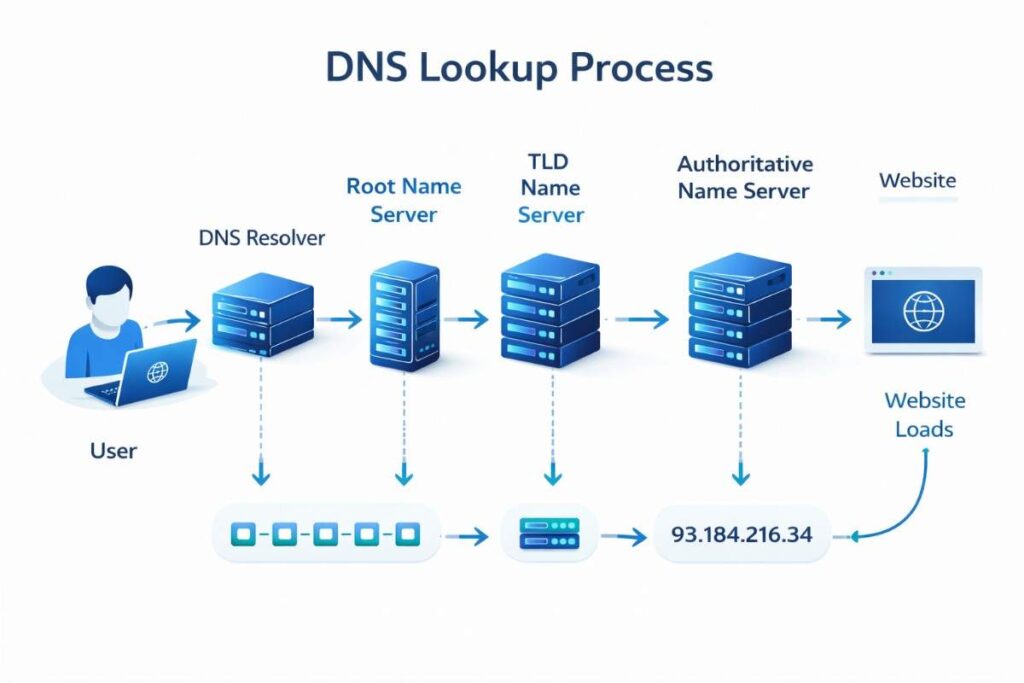
- DNS Resolver: The server that handles your lookup request
- Name Servers: Servers that store and provide DNS records
- DNS Records: Individual entries that map names to addresses and other data
DNS was invented in 1983 by computer scientist Paul Mockapetris to replace a simple, unscalable text file called HOSTS.TXT that previously mapped all domain names manually. Today, DNS handles billions of lookups every single day without a single central point of control.
Step 1: You Type a Domain Name
The DNS process begins the moment you type a web address — such as www.example.com — into your browser and press Enter. This address is called a URL (Uniform Resource Locator).
Your browser understands that it needs to find the IP address for this domain before it can do anything else. A domain name means nothing to a computer on its own. It must be translated into a numerical IP address first.
What Happens at This Stage:
- Your browser prepares to send a lookup request
- It begins by checking local sources before reaching out to external servers
- Your device connects through your Internet Service Provider (ISP) if needed
- The clock starts — this entire process will complete in under 100 milliseconds
This first step is the trigger for everything that follows. The simplicity of typing a domain name hides a remarkably complex system working silently in the background.
Step 2: The Browser Checks Its Cache
Before sending any request to an external server, your browser checks its own local cache — a small, temporary storage area where it keeps recently visited DNS results.
If you visited www.example.com an hour ago, your browser may already have the IP address stored. In that case, DNS resolution skips all remaining steps and the page begins loading immediately. This is why revisiting websites often feels faster than visiting them for the first time.
The Cache Checking Order:
- Browser cache: Chrome, Firefox, Safari all store DNS results locally
- Operating system cache: Your device’s OS keeps its own DNS cache
- Router cache: Your home router may also remember recent lookups
- ISP resolver cache: Your internet provider’s server caches popular domains
Each cached result has a TTL (Time to Live) value — a countdown that tells the device how long to trust that cached result before requesting a fresh lookup. Once TTL expires, the full DNS process begins again.
Step 3: The Query Goes to the DNS Resolver
If no cached answer is found, your device sends the DNS query to a Recursive DNS Resolver. This is typically a server operated by your ISP, though many users switch to faster, more private public resolvers like:
- Cloudflare: 1.1.1.1
- Google Public DNS: 8.8.8.8
- OpenDNS: 208.67.222.222
The resolver’s job is to act as a middleman — it does the hard work of finding the answer by contacting other DNS servers on your behalf. Think of the resolver as a librarian: you ask for a book, and the librarian goes and finds it for you rather than directing you to search the entire library yourself.
What the Resolver Does:
- Receives your DNS query from your device
- Checks its own cache for a stored answer
- If no answer is cached, begins contacting other name servers
- Manages the entire lookup process on your behalf
- Returns the final IP address to your browser once found
The resolver is the most important server in understanding how does DNS work, because it orchestrates the entire resolution process.
Step 4: The Resolver Contacts the Root Name Server
If the resolver doesn’t have the answer in its cache, it contacts one of the 13 sets of Root Name Servers distributed across the globe. These root servers sit at the very top of the DNS hierarchy.
Root servers do not know the IP address for www.example.com. However, they know exactly where to send the resolver next based on the domain extension (.com, .org, .net, .in, etc.).
Key Facts About Root Name Servers:
- There are 13 sets of root servers worldwide (labeled A through M)
- Each set contains hundreds of physical servers through a technique called anycast routing
- They are operated by organizations including ICANN, NASA, and Verisign
- They handle hundreds of millions of queries every day
- Root servers are the starting point for all DNS lookups that are not cached
The root server responds to the resolver with the address of the next server in the chain — the TLD Name Server responsible for the domain’s extension.
Step 5: The TLD Name Server Is Queried
The resolver now contacts the Top-Level Domain (TLD) Name Server. The TLD is the last part of a domain name — the .com in www.example.com, or .org, .net, .in, and so on.
Each TLD has its own set of name servers. For example, the .com TLD is managed by Verisign, which maintains records for over 150 million .com domain names.
Common TLD Examples:
- .com — Commercial websites (managed by Verisign)
- .org — Organizations (managed by Public Interest Registry)
- .net — Network infrastructure
- .in — India’s country-code TLD
- .gov — U.S. government websites
The TLD name server doesn’t know the final IP address either. But it knows which Authoritative Name Server is responsible for the specific domain being looked up — and that is where it sends the resolver next.
Fun Fact: The entire journey from the resolver to the root server to the TLD server and back typically adds only a few milliseconds to the overall DNS process.
Step 6: The Authoritative Name Server Responds
This is the final stop in the DNS lookup process. The resolver reaches the Authoritative Name Server for the specific domain — in this example, www.example.com.
The authoritative name server is the ultimate source of truth for a domain’s DNS information. It holds all the official DNS records for that domain and provides the definitive, final answer to the resolver’s query.
What the Authoritative Server Returns:
- The exact IP address for the requested domain (e.g., 93.184.216.34)
- The TTL value, telling the resolver how long to cache this answer
- Any other relevant DNS records (such as mail server information)
Once the resolver receives this answer, it caches the result according to the TTL value — so future queries for the same domain can be answered faster — and then passes the IP address back to your browser.
Example:
- You requested: www.example.com
- Authoritative server confirms: 93.184.216.34
- TTL returned: 3600 seconds (the answer is valid for 1 hour)
Step 7: Your Browser Connects to the Website
With the IP address now in hand, the DNS process is complete. Your browser uses the returned IP address to establish a direct connection to the web server hosting the website.
The Final Connection Steps:
- Browser receives the IP address from the DNS resolver
- Browser initiates a TCP connection to the server at that IP address
- If the site uses HTTPS (which it should), a TLS handshake encrypts the connection
- Browser sends an HTTP request for the webpage content
- Server responds with HTML, CSS, JavaScript, and images
- Browser renders everything and displays the completed page on your screen
This entire 7-step process — from typing the domain name to seeing the fully loaded website — typically takes under 100 milliseconds. That is faster than the blink of a human eye.
Key DNS Components That Make It Work
Understanding how does DNS work at a deeper level means knowing these four essential server types:
DNS Recursive Resolver
The middleman that handles your query end-to-end. It contacts all other servers on your behalf and returns the final answer. Operated by your ISP or a public provider like Google or Cloudflare.
Root Name Server
The starting point of every uncached DNS lookup. There are 13 sets distributed globally. They don’t hold IP addresses — they direct resolvers to the right TLD server.
TLD Name Server
Manages all domains within a specific extension (.com, .org, .net). Directs the resolver to the correct authoritative name server for the specific domain.
Authoritative Name Server
The final authority. Holds the actual DNS records for a domain and provides the definitive IP address. Usually operated by domain registrars or hosting providers.
What Are DNS Records?
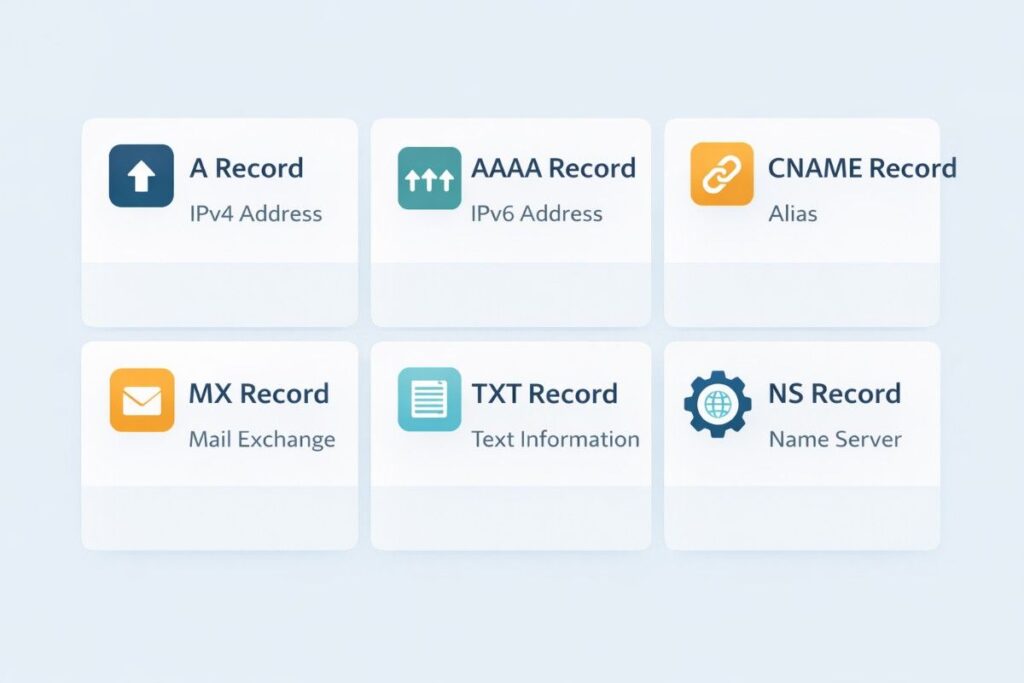
DNS records are the individual data entries stored on an authoritative name server. Each record type serves a specific purpose.
The Most Important DNS Record Types:
- A Record: Maps a domain name to an IPv4 address. The most common record type.
- AAAA Record: Maps a domain name to an IPv6 address. Growing in use as IPv6 expands.
- CNAME Record: Canonical Name — points one domain to another (e.g., www.site.com → site.com).
- MX Record: Mail Exchange — directs email traffic to the correct mail server.
- TXT Record: Stores text data. Used for email authentication (SPF, DKIM) and domain verification.
- NS Record: Name Server — identifies which servers are authoritative for a domain.
- TTL Value: Time to Live — controls how long DNS results are cached before a fresh lookup is needed.
Example: When you send an email to someone@example.com, your mail server performs a DNS lookup for the MX record of example.com to find the correct mail server to deliver the message to.
DNS Caching Explained
DNS caching is one of the most important reasons the internet feels fast. Instead of completing the full 7-step lookup every single time, DNS results are stored at multiple levels:
Caching at Each Level:
- Browser cache: Stores results for minutes to hours depending on TTL
- Operating system cache: Your device maintains its own DNS cache
- Resolver cache: ISP and public resolvers cache popular domains
- Router cache: Some routers cache DNS results for local devices
Without caching, every single website visit would require a full DNS lookup through root servers, TLD servers, and authoritative servers — dramatically slowing down the internet.
How to Clear Your DNS Cache:
- Windows: Open Command Prompt → type
ipconfig /flushdns - Mac: Open Terminal → type
sudo dscacheutil -flushcache - Android/iPhone: Toggle airplane mode on and off, or restart the device
Clearing your DNS cache is useful when a website has recently changed its IP address and you are still being directed to the old server.
DNS and Your Privacy
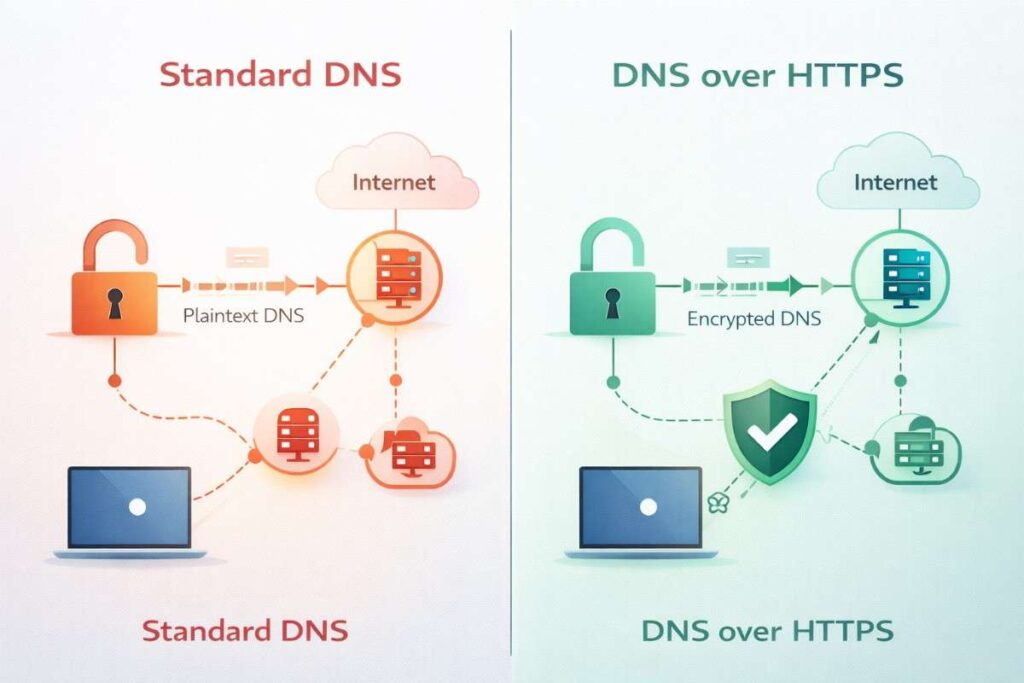
One important thing most people don’t realize: traditional DNS queries are sent in plain text. This means your ISP, network administrator, or anyone monitoring your connection can see every domain name you look up — even if the website itself uses HTTPS.
Technologies That Protect DNS Privacy:
- DNS over HTTPS (DoH): Encrypts DNS queries inside standard HTTPS traffic, hiding them from network observers. Now built into Chrome, Firefox, and Edge by default.
- DNS over TLS (DoT): Encrypts DNS queries using the TLS protocol, the same encryption used for secure websites.
- DNSSEC: DNS Security Extensions add digital signatures to DNS records, protecting against DNS spoofing and cache poisoning attacks.
Actionable Tips:
- Switch your DNS resolver to Cloudflare (1.1.1.1) or Google (8.8.8.8) for faster, more reliable lookups
- Enable DNS over HTTPS in your browser settings for encrypted queries
- Use a VPN to encrypt all your internet traffic, including DNS queries
DNS security explained by Internet Engineering Task Force:
👉 https://datatracker.ietf.org/doc/html/rfc1034
Common Misconceptions About DNS
Myth 1: DNS only affects website loading Reality: DNS is used for email routing, app connections, video streaming, online gaming, and almost every internet-connected activity — not just browsing websites.
Myth 2: Your DNS provider can’t see what you visit Reality: Your DNS resolver sees every domain name you query. Choosing a privacy-focused resolver like Cloudflare (which logs no personal data) matters for your privacy.
Myth 3: Changing DNS is complicated and risky Reality: Switching to a different DNS resolver takes less than two minutes in your network settings and can improve both speed and privacy significantly.
Myth 4: DNS changes are instant Reality: When a website changes its DNS records, it can take anywhere from a few minutes to 48 hours for the update to fully propagate worldwide — due to TTL caching at every level.
Myth 5: HTTPS makes DNS secure Reality: HTTPS encrypts the data between your browser and a website, but traditional DNS lookups happen before that connection and are not encrypted by default.
Expert Tips and Best Practices
For Everyday Users:
- Switch to a faster public DNS resolver (1.1.1.1 or 8.8.8.8) for noticeably quicker page loads
- Enable DNS over HTTPS in your browser for private, encrypted DNS queries
- Clear your DNS cache if a website isn’t loading correctly after a known update
- Use a VPN for full traffic encryption, including DNS
For Website Owners:
- Set appropriate TTL values — lower TTLs before a planned IP migration, higher TTLs during stable periods
- Always configure DNSSEC on your domain to prevent spoofing attacks
- Use a reliable, redundant authoritative DNS provider to avoid downtime
- Audit your DNS records regularly to remove outdated or unused entries
For Tech Enthusiasts:
- Use
nslookupordigcommands to manually query DNS records from your terminal - Run
tracerouteto see the path your DNS queries take through the network - Study the full DNS protocol specification in RFC 1034 and RFC 1035
- Explore split-horizon DNS for advanced internal vs. external DNS configurations
Frequently Asked Questions
Q1: What is DNS in simple terms?
DNS is the internet’s address book. It converts human-friendly website names like google.com into the numerical IP addresses (like 142.250.190.46) that computers actually use to connect to each other. Without DNS, you would need to memorize a unique number for every website you visit.
Q2: How long does a DNS lookup take?
A full DNS lookup — from resolver to root server to TLD server to authoritative server — typically takes between 20 and 120 milliseconds. However, when results are cached at the browser, OS, or resolver level, it can take less than 1 millisecond.
Q3: What happens if DNS goes down?
If your DNS resolver becomes unavailable, you lose the ability to translate domain names into IP addresses. Websites will appear to be “down” even though they are perfectly fine. Switching to an alternative public DNS server like 8.8.8.8 or 1.1.1.1 usually resolves this instantly.
Q4: Can DNS affect my internet speed?
Yes. Slow DNS resolution adds latency to every new website visit. Cloudflare’s 1.1.1.1 resolver is consistently ranked the world’s fastest public DNS resolver. Switching from your ISP’s default resolver to 1.1.1.1 can produce a noticeable improvement in page load times.
Q5: What is DNS spoofing and how can I protect myself?
DNS spoofing (also called cache poisoning) is a cyberattack where malicious actors inject fake DNS records to redirect users to fraudulent websites. You can protect yourself by using a DNS resolver that supports DNSSEC validation and enabling DNS over HTTPS in your browser settings.
Conclusion
Understanding how does DNS work reveals the elegant, invisible system that makes the modern internet usable for billions of people. Every time you type a domain name, a precisely coordinated sequence of queries travels through resolvers, root servers, TLD servers, and authoritative name servers — all within a fraction of a second — to deliver the correct IP address to your browser.
Key Takeaways:
- DNS translates human-readable domain names into IP addresses computers can use
- A full DNS lookup involves four key servers: resolver, root, TLD, and authoritative
- Caching at every level keeps DNS fast and reduces redundant queries
- DNS records like A, CNAME, and MX each serve a specific networking purpose
- Traditional DNS is unencrypted — tools like DoH and DNSSEC protect your privacy
The next time a website loads in an instant, you will know exactly what happened behind the scenes. And if a site ever fails to load, you will know the first thing to check: your DNS.
Take Action: Want to see DNS in action right now? Open your command prompt and type nslookup google.com on Windows, or dig google.com on Mac or Linux. You will see the exact IP address your DNS resolver returns — live, in real time.