Introduction
Every time you browse the internet, your location, identity, and online activities are exposed to websites, internet service providers, and potentially malicious actors. A Virtual Private Network (VPN) acts as a protective shield, encrypting your data and masking your identity. But how does a VPN work exactly? Understanding the mechanics behind VPN technology empowers you to make informed decisions about your online privacy. This guide breaks down how does a VPN work, explains encryption methods, and provides practical insights to help you choose the right VPN for your needs.
What Is a VPN and Why Should You Care?
A VPN is a technology that creates a secure, encrypted tunnel between your device and the internet. It masks your real IP address, making your online activities private and secure.
The Problem It Solves
Without a VPN, your internet service provider (ISP), government agencies, hackers, and websites can see:
- Your real IP address and location
- Every website you visit
- Files you download
- Messages you send (if unencrypted)
- Your browsing history
Why Privacy Matters
- Identity protection: Prevents cybercriminals from targeting you
- Financial security: Protects banking and payment information
- Freedom of expression: Enables safe access to information globally
- Data protection: Keeps sensitive information confidential
- Public Wi-Fi safety: Secures your connection on unsecured networks
How Does a VPN Work? The Complete Process
Understanding how a VPN creates and maintains secure connections reveals its true power.
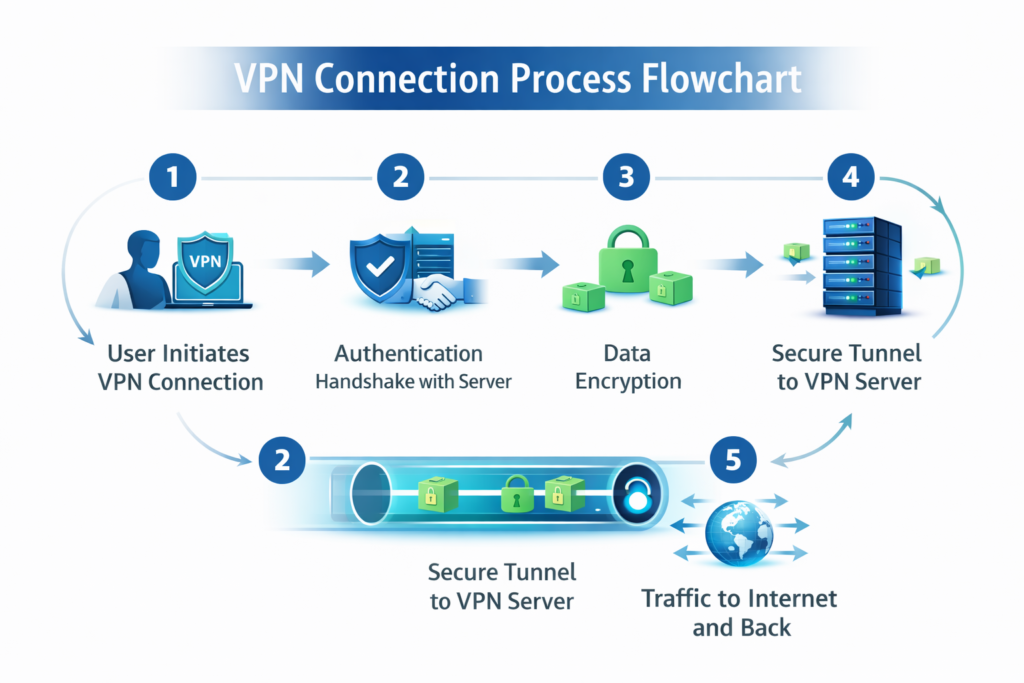
The Five-Step Connection Flow
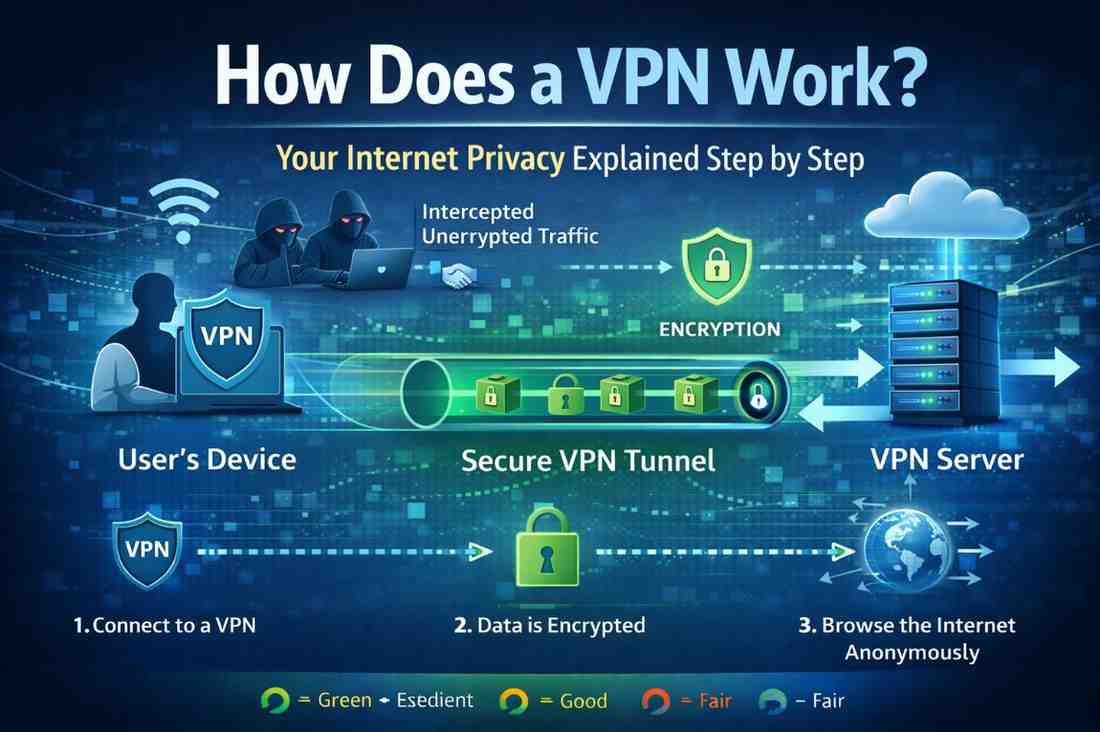
Step 1: Initiating the Connection
You launch your VPN application and click “Connect.” The app initiates a connection request to a VPN server located somewhere in the world—potentially thousands of miles from your actual location.
Step 2: Authentication and Handshake
Your device authenticates with the VPN server using credentials. A cryptographic handshake occurs, establishing that you’re a legitimate user. The server verifies your credentials and grants access.
Step 3: Encryption of Your Data
All data leaving your device gets encrypted using protocols like OpenVPN, WireGuard, or IKEv2. This encryption transforms readable information into an unreadable code that requires a specific encryption key to decode.
Step 4: Tunneling to the VPN Server
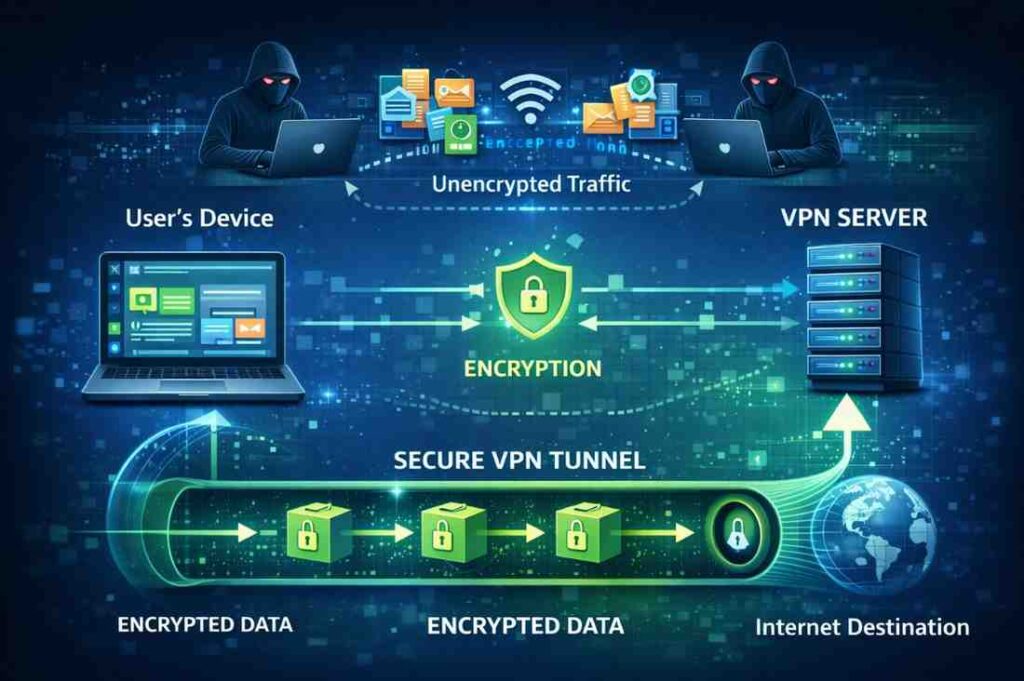
Your encrypted data travels through a secure tunnel to the VPN server. This tunnel is like a protected channel—even if intercepted, the data remains unreadable due to encryption.
Step 5: Exit and Onward Routing
The VPN server decrypts your data and forwards your requests to websites and online services using the server’s IP address. Responses come back to the VPN server, get encrypted again, and travel back through the tunnel to your device.
Simplified Flow Diagram
Your Device → Encryption → Secure Tunnel → VPN Server → Internet
Internet ← Decryption ← Secure Tunnel ← VPN Server ← Websites
VPN Encryption: The Technology Behind Security
Encryption is the cornerstone of how a VPN works. Without it, the tunnel would be pointless.
How Encryption Works
Encryption converts plain-text data into cipher-text using mathematical algorithms. Two encryption approaches exist:
Symmetric Encryption
Both sender and receiver use the same key to encrypt and decrypt data. Think of it as a shared secret code. It’s fast but requires secure key exchange.
Asymmetric Encryption
Two different keys exist—a public key anyone can use and a private key only the recipient knows. Messages encrypted with the public key can only be decrypted with the private key. This solves the key-sharing problem.
VPN Encryption Standards
| Protocol | Security Level | Speed | Best For |
|---|---|---|---|
| OpenVPN | High | Moderate | All-purpose use |
| WireGuard | Very High | Very Fast | Modern devices |
| IKEv2 | High | Fast | Mobile users |
| L2TP/IPsec | High | Moderate | Legacy systems |
| PPTP | Low | Fast | Outdated, avoid |
VPN Tunneling: Creating the Secure Pathway
Tunneling is the process that encapsulates your data within encrypted layers, creating a protected pathway through the internet.
How Tunneling Protects You
Imagine sending a letter through the mail. Without a tunnel, anyone handling it can read the contents. With VPN tunneling, your letter is placed in a locked box (encryption) before being sent. The postal service (internet) never sees the letter’s contents.
Encapsulation Process
- Your data packet is created with source and destination information
- An encryption layer wraps around it (first layer of protection)
- A tunneling protocol adds its own header (second layer)
- The VPN server’s address becomes the new destination
- Multiple layers protect your original data
Multi-Layer Protection
Modern VPN services use multiple tunneling and encryption layers, ensuring that even if one layer is compromised, others remain intact.
IP Address Masking: Hiding Your Identity
One of the most important functions of how a VPN works is IP address masking.
What Is Your IP Address?
Your IP (Internet Protocol) address is a unique identifier assigned to your device. It reveals:
- Your approximate physical location
- Your internet service provider
- Your device type
- Potentially your identity
How VPN Masks Your IP
When connected to a VPN:
- Websites see the VPN server’s IP address, not yours
- Your real location remains hidden
- Your ISP cannot see which websites you visit
- Advertisers cannot track you by IP address
- You appear to be browsing from the VPN server’s location
IP Rotation and Multiple Servers
Many VPN services offer:
- IP rotation: Your IP changes periodically, further enhancing anonymity
- Multiple server locations: Choose servers in different countries
- Dedicated IPs: Some services provide fixed IPs for specific purposes
VPN Protocols Explained
VPN Protocol Comparison Chart (2026)
| Feature / Protocol | OpenVPN | WireGuard | IKEv2/IPSec | L2TP/IPSec |
|---|---|---|---|---|
| 🔒 Security Level | 🟢 Excellent | 🟢 Excellent | 🟡 Good | 🔴 Fair |
| ⚡ Speed Performance | 🟡 Good | 🟢 Excellent | 🟡 Good | 🟡 Moderate |
| 💻 Compatibility | 🟢 Universal (All devices) | 🟡 Modern systems | 🟢 Strong (Mobile + OS native) | 🟡 Limited (Legacy support) |
| 🌐 Firewall Bypass | 🟢 Excellent (TCP 443) | 🟡 Moderate | 🟡 Moderate | 🔴 Weak |
| 📱 Mobile Performance | 🟡 Average | 🟢 Excellent | 🟢 Excellent | 🟡 Average |
| 🔋 Battery Efficiency | 🔴 High usage | 🟢 Low usage | 🟢 Efficient | 🟡 Moderate |
| 🧠 Best Use Case | Privacy, security, bypass censorship | Streaming, gaming, fast browsing | Mobile users, switching networks | Older devices, legacy systems |
Different VPN protocols handle encryption and tunneling differently. Choosing the right one impacts your security and speed.
OpenVPN (Industry Standard)
Strengths: Highly secure, open-source, works on all platforms, bypasses firewalls
Weaknesses: Slightly slower than newer protocols, more CPU intensive
Best For: Comprehensive security across all devices
WireGuard (Modern Lightweight)
Strengths: Ultra-fast, minimal code base, excellent performance, modern cryptography
Weaknesses: Newer, less tested historically, limited features
Best For: Speed-focused users with modern devices
IKEv2 (Mobility Champion)
Strengths: Excellent for mobile users, quick reconnection, stable connection switching
Weaknesses: Less widely adopted, proprietary implementations vary
Best For: Smartphone and laptop users on mobile networks
L2TP/IPsec (Double Tunneling)
Strengths: Uses double encryption for extra security, widely supported
Weaknesses: Slower performance, more complex setup
Best For: Users prioritizing security over speed
What Your VPN Does (And Doesn’t) Protect
Full Protection Coverage
✓ Hides your IP address from websites and ISPs
✓ Encrypts all traffic from your device to the VPN server
✓ Secures public Wi-Fi connections
✓ Prevents DNS leaks on quality VPN services
✓ Blocks ISP throttling (intentional speed reduction)
✓ Protects DNS queries from snooping
✓ Masks your location to the outside world
What VPNs Cannot Protect
✗ Malware infections on your device
✗ Phishing attacks and social engineering
✗ Account breaches if passwords are weak
✗ Downloaded files infected with viruses
✗ Tracking via accounts (Facebook, Google logins reveal identity)
✗ Browser fingerprinting advanced tracking techniques
✗ Physical tracking if your identity is known
How VPN Servers Work
Understanding server infrastructure clarifies how a VPN maintains your privacy.
Server Architecture
VPN services operate networks of servers across multiple countries. When you connect:
- You select a server location (or auto-select based on speed)
- Your device connects to that specific server
- The server handles all internet communication on your behalf
- Response traffic routes back through the same server
- Your device decrypts and processes the information
Server Locations and Privacy
More server locations offer:
- Better speed (connect to geographically closer servers)
- Location spoofing (appear to be browsing from different countries)
- Redundancy (if one server fails, others remain available)
- Geographic content access (watch region-specific content)
Server Logging Policies
Critical consideration: does your VPN provider log your activities?
- No-log policy: Server doesn’t record your activities (best for privacy)
- Limited logging: Stores only connection timestamps, not browsing data
- Full logging: Records all activities (defeats privacy purpose)
Verify your VPN’s actual logging policy—claims don’t always match reality.
VPN Performance and Speed Impact
How does a VPN work without significantly slowing your internet?
Speed Reduction Factors
VPN connections typically reduce speeds by 10-30% due to:
- Encryption overhead: Time spent encrypting/decrypting data
- Server distance: Farther servers mean longer data travel time
- Server load: Busy servers handle requests more slowly
- Protocol choice: Some protocols faster than others
- Your ISP speeds: Starting speed determines final VPN speed
Optimizing VPN Performance
- Choose nearby servers: Reduced latency, faster speeds
- Select appropriate protocol: WireGuard offers best speed currently
- Enable hardware acceleration: Modern devices use CPU optimization
- Close unnecessary apps: Reduces competing bandwidth demands
- Connect directly: Use wired connection instead of Wi-Fi
- Pick off-peak hours: Fewer users = less server congestion
Common VPN Misconceptions
Myth #1: VPNs Make You Completely Anonymous
Reality: VPNs hide your IP and encrypt traffic, but the VPN provider can see your activities. Using a VPN service while logged into personal accounts (email, social media) still reveals your identity.
Myth #2: A VPN Prevents All Hacking
Reality: VPNs protect data in transit but don’t prevent malware infections, phishing, or compromised passwords. They’re one security layer among many needed.
Myth #3: Free VPNs Are Just as Good as Paid
Reality: Free VPNs often log data, serve ads, have slower speeds, limited servers, and lack proper security. Most monetize by selling your data, defeating the privacy purpose.
Myth #4: Using a VPN Is Illegal
Reality: VPNs are legal in most countries. However, using a VPN for illegal activities (hacking, downloading pirated content) remains illegal. Check local regulations in your country.
Myth #5: VPNs Prevent Government Surveillance
Reality: Strong encryption protects traffic, but determined government agencies can compel VPN providers to reveal information. No VPN offers perfect immunity from powerful government surveillance.
Latest VPN Technology Trends (2024-2026)
Split Tunneling Advancement
Modern VPNs allow selective routing—send some traffic through the VPN while other traffic goes directly online. Useful for local services while protecting sensitive data.
VPN Integration in Operating Systems
Windows, macOS, iOS, and Android increasingly include native VPN capabilities, reducing reliance on third-party apps.
Decentralized VPN Networks
Emerging projects create VPN services using blockchain technology and distributed networks, eliminating central points of failure.
AI-Enhanced Threat Detection
VPN providers now use artificial intelligence to detect and block malware, phishing attempts, and malicious websites in real-time.
Zero-Knowledge Architecture
Advanced VPNs implement zero-knowledge proofs, mathematically proving they never see user data without actually storing it.
Pros and Cons of Using a VPN
Advantages
✓ Enhanced privacy: Hide browsing from ISP and government
✓ Public Wi-Fi protection: Secure connections on open networks
✓ Bypass geographic restrictions: Access region-locked content
✓ Prevent ISP throttling: Faster speeds on throttled connections
✓ IP spoofing: Appear to browse from different locations
✓ Protection from tracking: Advertisers can’t follow you by IP
✓ Cost-effective: Affordable security for multiple devices
Disadvantages
✗ Speed reduction: Encryption and routing slightly slow connections
✗ Trust dependency: Requires trusting VPN provider with your data
✗ Limited anonymity: Doesn’t hide identity if logged into accounts
✗ Streaming restrictions: Some services block VPN users
✗ Mobile battery drain: VPN apps consume extra battery power
✗ Setup complexity: Initial configuration can confuse beginners
✗ Subscription costs: Quality VPNs require monthly payments
Expert Tips for Maximizing VPN Security
Choose VPN Features Wisely
Look for VPNs offering:
- Kill switch (disconnects internet if VPN drops)
- DNS leak protection (prevents address leaks)
- No-log verification (third-party audits confirm policies)
- Multiple authentication protocols
- Dedicated IP options for specific needs
Implement Layered Security
Never rely on VPN alone:
- Use strong, unique passwords with a password manager
- Enable two-factor authentication on important accounts
- Keep software and operating systems updated
- Install antivirus and anti-malware protection
- Maintain browser security with privacy-focused extensions
Regular Security Audits
Periodically:
- Test for IP leaks using online tools
- Verify DNS leak protection
- Review VPN’s latest security reports
- Update VPN app to latest version
- Check your VPN provider’s privacy policy changes
Device-Specific Optimization
- Computers: Use OpenVPN or WireGuard for maximum control
- Smartphones: Prefer IKEv2 for seamless network switching
- Smart TVs: Confirm VPN compatibility before purchasing
- Routers: Consider VPN-enabled routers for whole-network protection
Frequently Asked Questions
How does a VPN work on public Wi-Fi networks?
On public Wi-Fi, your unencrypted traffic is vulnerable to interception. A VPN encrypts everything leaving your device before it enters the public network. The coffee shop Wi-Fi only sees encrypted data heading to your VPN server, protecting your passwords, messages, and browsing from other network users.
Can my VPN provider see what I’m doing online?
Yes, the VPN provider can technically see your activities since your data passes through their servers. However, quality VPN providers with no-log policies claim not to record this information. Always verify logging policies through independent audits or privacy certifications rather than taking company claims at face value.
Does a VPN hide my activity from my internet service provider?
Yes, completely. Your ISP cannot see which websites you visit, what files you download, or what services you use when connected to a VPN. They only see that you’re connected to a VPN server and the amount of data you’re transferring.
Will a VPN work with streaming services like Netflix?
Most streaming services detect and block VPN connections to prevent geographic restriction bypassing. Some VPNs specifically optimize to work with Netflix, but there’s no guarantee. Check with your VPN provider about streaming compatibility before subscribing.
How much does a good VPN cost?
Quality VPN services typically cost $3-12 monthly when paying annually, or $8-15 per month for monthly subscriptions. Free VPNs exist but often compromise privacy through logging or slow speeds. Investing in a reputable paid service ensures proper security and reliable performance.
Should I use a VPN on all my devices?
Ideally, yes. Each device connecting to the internet can leak information. Install VPN apps on smartphones, laptops, tablets, and consider VPN-enabled routers for whole-network protection. This ensures consistent privacy across all your internet activities.
Conclusion
Understanding how a VPN works—from encryption and tunneling to server architecture and IP masking—reveals why VPNs are essential privacy tools in today’s connected world. VPNs encrypt your data, hide your IP address, and create secure pathways through the internet, protecting you from ISPs, hackers, and surveillance.
However, VPNs aren’t magic solutions. They work best as one component of comprehensive internet security alongside strong passwords, updated software, and careful browsing habits. Choose a reputable VPN provider with transparent logging policies, multiple protocol options, and independent security audits.
Take action today: Evaluate your privacy needs, research VPN options matching your requirements, and implement a VPN into your security routine. Whether protecting public Wi-Fi connections, securing sensitive work communications, or maintaining general privacy, a quality VPN provides peace of mind and tangible security benefits that every internet user deserves.